
What is PICME 3.0 and why the login matters
PICME (Pregnancy & Infant Cohort Monitoring & Evaluation) is Tamil Nadu’s digital backbone for registering pregnancies, assigning an RCH ID, and tracking antenatal to postnatal care for mothers and infants. The picme 3.0 login portal centralizes everything—self-registration, verification, benefit applications, and status checks—so families and Village/Urban Health Nurses (VHN/UHN) can work from the same data. When you get your RCH ID through the portal, you unlock streamlined services, faster follow-ups, and easier benefit disbursal.
Who typically uses the portal
- Expectant mothers and families: start self-registration, check application status, and review visit schedules.
- VHN/UHN & PHC teams: validate registrations, update visit outcomes, and support MRMBS processing.
- Program administrators: monitor coverage, due lists, and service gaps across blocks and districts.
The PICME 3.0 login page at a glance
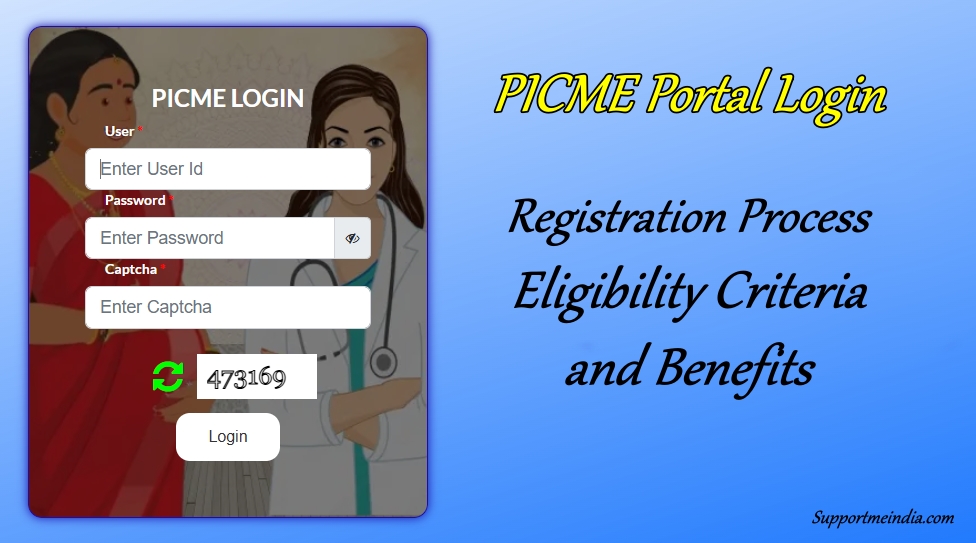
When you open the portal, you’ll see a clean login panel with fields for User, Password, and Captcha, plus a prominent Self-Registration for RCH ID link in English and Tamil. Even if you don’t have a user account yet, you can start with self-registration to secure your RCH ID. During peak public campaigns (like Breastfeeding Week), the banner area may carry timely health messages.
You can expect these elements on the screen:
- Standard login (User / Password / Captcha)
- Self-Registration for RCH ID entry point for mothers
- Links that route you to pregnancy enrollment and benefit workflows once you’re verified
Step-by-step: Self-registration for your RCH ID via PICME 3.0
The self-registration flow is designed to be simple for families and easy for VHNs to validate later. Here’s the practical, field-tested way to complete it:
1) Start self-registration
Click Self-Registration for RCH ID on the picme 3.0 login page. Keep your mobile number, address, and ID proof handy before you begin so you don’t time out.
2) Enter mother’s profile details
Fill in the mother’s name, date of birth, marital status, mobile number, and residential address. Use an active mobile number because OTPs and status messages are tied to it. If you’re helping a family member, confirm the spelling of names exactly as in IDs—this avoids corrections later.
3) Provide pregnancy information
You will enter LMP (Last Menstrual Period) or EDD (Expected Date of Delivery) and basic clinical information. These dates power the system’s due-lists and visit reminders (ANC visits, TT immunization, investigations), so accuracy helps your PHC team schedule support.
4) Choose your local facility correctly
Select the appropriate PHC/UPHC and administrative unit. This ensures the right VHN/UHN sees your record, visits your home if needed, validates your details, and connects you to services and schemes in your area.
5) Submit and keep your acknowledgement
On submission, note or screenshot the pre-registration acknowledgement/ID. An SMS should also arrive on the registered number. This pre-registration is your bridge to the final RCH ID after VHN/UHN verification.
6) Expect VHN/UHN verification
A VHN/UHN reviews your pre-registration, confirms address and pregnancy particulars, and finalizes the record. After validation, your unique RCH ID is issued. Treat it like a digital health identity—it follows your maternity journey from registration to birth certification.
Logging in after you receive the RCH ID
Once your RCH ID is issued, you can use it to sign in to the picme 3.0 login portal.
How to log in properly
- Go to the login page and enter RCH ID as the username.
- Key in your password and the captcha, then submit.
- You’ll reach a dashboard with your profile, due services, application links (like MRMBS), and status tracking.
If you forget your password
Use Forgot Password on the login page. You’ll verify with your registered mobile number/OTP to reset access. If your mobile number changed, inform your VHN/UHN/PHC so they update the contact details tied to your record.
Applying for Dr. Muthulakshmi Reddy Maternity Benefit Scheme (MRMBS)
The picme 3.0 login dashboard provides the most direct path to MRMBS for eligible mothers. Think of the flow as a three-stage loop: apply → verify → disburse.
Application essentials inside the portal
- Eligibility & identity: mother’s details (age, address, income category as applicable), RCH ID, and bank information for transfers.
- Pregnancy proof: ANC card entries or clinical documents, as instructed by your PHC.
- Banking readiness: name as per bank records, account number, and IFSC to avoid payment failures.
Verification & sanction
Your VHN/UHN/PHC validates what you submitted. If clarifications are required (e.g., missing scan copy, name mismatch in bank passbook), respond quickly. Once approved, the sanction moves to electronic transfer.
Status tracking you can actually use
Inside your dashboard, you’ll typically see clear markers like Application Received, Under Verification, Approved, and Disbursed. If it stalls at any stage longer than the usual local timeline, contact your PHC or politely nudge your VHN/UHN with your application details.
Using PICME 3.0 for end-to-end pregnancy tracking
PICME isn’t just a form—it’s your care timeline.
Automated due-lists and reminders
Based on LMP/EDD, the system lays out your ANC visit plan, lab investigations, TT, iron-folic supplementation follow-ups, and counseling sessions. Timely SMS alerts help you stay on schedule; if you miss a visit, the VHN/UHN can follow up faster because your record is active.
Digital health records at your fingertips
Your portal profile shows what’s been recorded at each visit—vitals, tests, immunizations, advice, and referrals. If you ever move within Tamil Nadu, your digital trail helps the next facility pick up right where you left off.
Birth certificate readiness
Because the RCH ID is foundational for birth registration, you save time later—details already in the system reduce back-and-forth for certificates and allied services.
New in 2025: The PICME Parental app (what families should know)
Tamil Nadu has introduced a PICME Parental mobile app to make essential features simpler on phones. For families that prefer mobile over desktop, this is a big upgrade for day-to-day use.
Highlights that matter to parents:
- Self-registration for the RCH ID from your phone.
- MRMBS application & status tracking right within the app.
- Educational resources from pregnancy planning through child-rearing, so you have credible guidance on common questions without searching random sources online.
- Notifications tuned to your stage (appointments, investigations, immunizations).
If you’re helping someone with limited digital literacy, the app can reduce friction—fewer steps, fewer clicks. Encourage setting a screen lock and disabling app previews for privacy.
Troubleshooting common PICME 3.0 issues (with practical fixes)
“OTP not received” during self-registration
- Wait a few minutes; spotty network can delay delivery.
- Avoid repeating submissions too fast—use Resend OTP after the suggested wait.
- Confirm the mobile number and SIM signal; if you changed numbers, start the form again with the correct one.
“Village/Street not listed” in the administrative unit
- Select the nearest matching locality or the parent block and proceed.
- Note the discrepancy for your VHN/UHN; they can align the record during verification.
“Name/Date entered wrong”
- Don’t create a second application. Share the pre-registration ID with your VHN/UHN and request a correction at verification. Duplicate entries slow things down for everyone.
“Password forgotten” after RCH ID issue
- Use Forgot Password and reset via OTP.
- If your registered number no longer works, visit your PHC to update the contact field in your record.
“MRMBS stuck at Under Verification”
- Ensure your bank details are correct and the name matches the passbook.
- Keep ANC documentation ready; respond promptly if the nurse asks for clarity.
- Politely check with your PHC if timelines exceed your area’s usual processing window.
Best practices for a smooth PICME 3.0 experience
- Use your active mobile number and keep it consistent across the form, app, and bank account.
- Spell names exactly as on Aadhaar/bank records to prevent payment rejects.
- Set a strong password and store it safely; change it if you suspect sharing.
- Check your dashboard regularly—especially near visit due dates.
- Keep documents handy (ANC card, scan reports, bank passbook).
- Coordinate with your VHN/UHN—they’re your fastest route for corrections and quick approvals.
Security, privacy, and responsible use
Your RCH ID is a health identifier. Treat it with care—share it only with healthcare staff who need it. Avoid cybercafés for logins wherever possible; if you must, use private/incognito windows, never save passwords, and log out completely. On the mobile app, enable a device lock and keep OS/app updates current for security patches.
How picme 3.0 login supports continuity of care
From pregnancy registration to birth certification, the portal reduces missed visits, shortens benefit timelines, and ties together services across your PHC, district hospital, and urban health posts. For mothers, that means fewer queues and clearer next steps. For VHNs/UHNs, that means accurate due-lists and faster identification of who needs help today—not next month.
Frequently Asked Questions (new, practical, and not repeated above)
1) Can I complete picme 3.0 login steps if I’m not yet pregnant but planning?
Yes. If you’re newly married or planning, creating visibility in the system helps your health worker prioritize counseling and early pregnancy registration the moment you confirm.
2) I moved to a different block mid-pregnancy. Will my RCH ID still work?
Yes. Your RCH ID remains valid statewide. Inform your new PHC so your administrative unit and due-lists get reassigned. Your past records remain linked.
3) Is picme 3.0 login mandatory to receive the MRMBS benefit?
While the scheme’s eligibility and verification are handled by the health system, having an active RCH ID and a validated record is the practical path for smooth sanction and disbursal. Keep your details and bank information accurate.
4) Can I register if my Aadhaar card is under correction?
Proceed with the ID you currently have and alert your VHN/UHN. Minor ID updates are manageable during verification, but bank name matching is crucial for payments—so finalize bank KYC early.
5) How do I check whether my pre-registration was converted to a final RCH ID?
Use your pre-registration ID/mobile number on the portal to view status. If it shows “registered,” your RCH ID will be visible. If not, contact your VHN/UHN with your acknowledgement.
6) Can I add my spouse’s number for notifications too?
Keep one primary number for OTPs. If your family shares phones, document the primary number on your ANC card and inform your VHN/UHN to reduce missed messages.
7) My bank credited the benefit, but the portal still shows “Disbursed – Processing.” Do I need to report it?
It’s fine—system sync can lag. Keep the credit SMS/passbook entry as proof. If the portal stays unchanged for long, mention it during your next visit so the record reflects the true status.
Final word
The picme 3.0 login ecosystem is more than a website—it’s Tamil Nadu’s integrated way to ensure no mother or infant is left behind. If you keep your contact details current, respond quickly to your VHN/UHN, and check your dashboard or app regularly, you’ll find that everything from RCH ID to MRMBS moves faster and with fewer hurdles. Share this guide with families in your neighborhood WhatsApp groups and help more mothers get on track early.
